
Divi AI is the AI feature inside the Divi theme and builder from Elegant Themes. It writes text, creates images, generates code and builds layouts. In 2026 it also includes the Agent, a chat assistant for Divi 5 that can change a whole page.
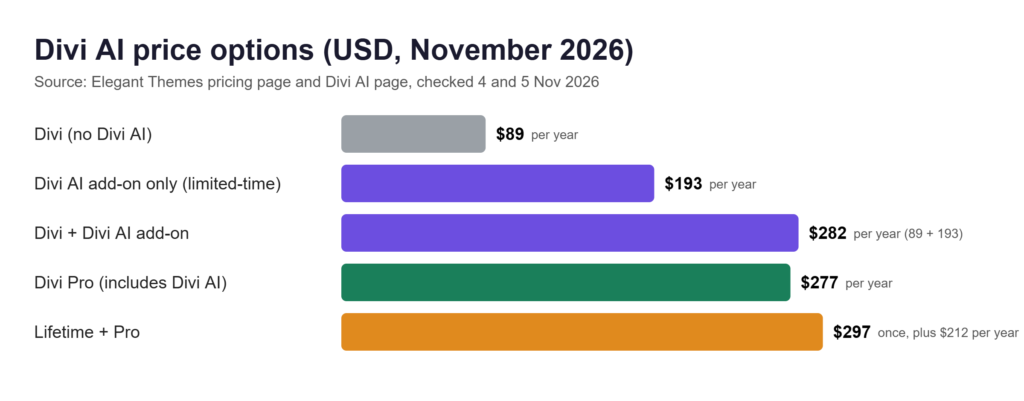
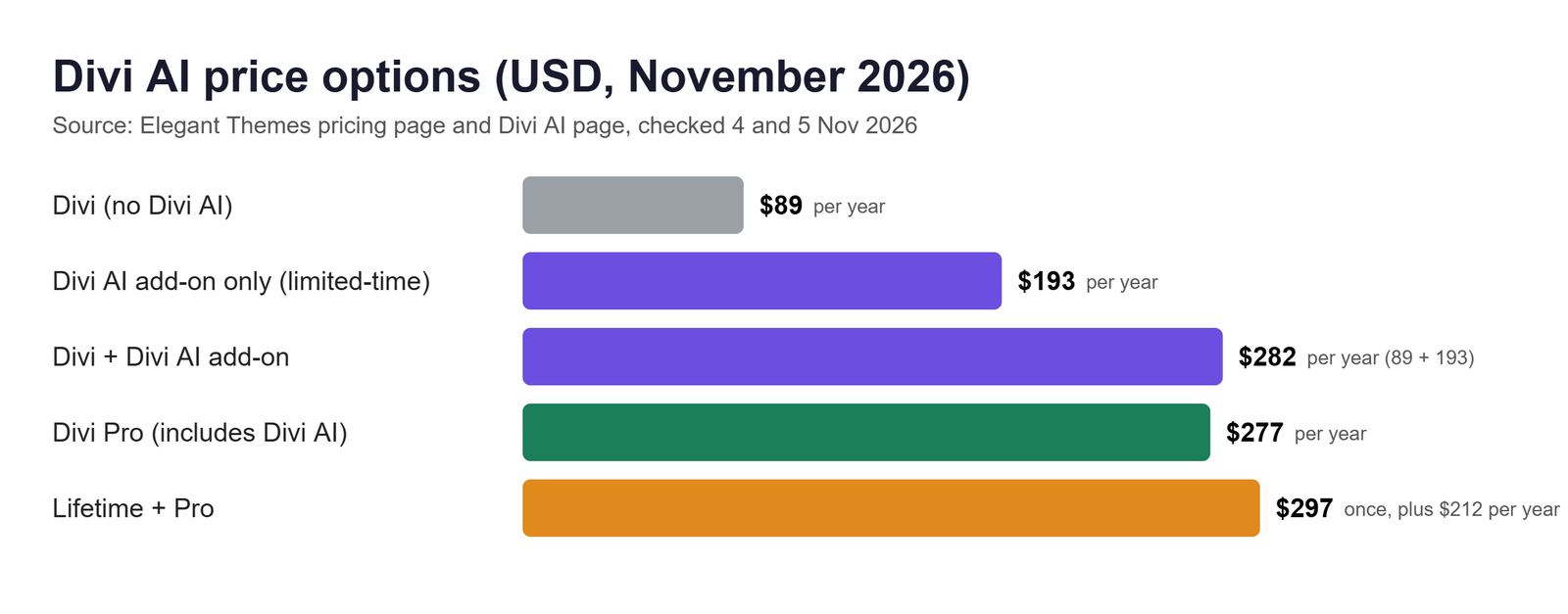
The short answer on price: Divi AI is included in Divi Pro, which costs $277 a year (checked on 4 and 5 November 2026). However, the $89 Divi plan does not include it. Existing Divi users can also add it alone for $193 a year or $21.36 a month, which Elegant Themes lists as a limited-time discount.
This guide uses official pages, not our own testing. For other tools, see our list of AI web design tools.
What Divi AI Includes
It works inside the Divi builder. Also, Also, Elegant Themes says there is nothing to install or activate. In addition, text, image and code tools need Divi 4.22 or newer, or Divi 5.
- Text: writes text and suggests edits to existing content, in any language.
- Images: creates images from a prompt. Prompts must be in English. Elegant Themes says the images are royalty-free, including for commercial use.
- Code: generates code.
- Layouts and full sites: builds a page layout, or a full site (the help pages call this Quick Sites).
Elegant Themes also calls generation unlimited “subject to our fair use policy” and does not define that policy. However, some pages say “no usage limits”; we use the more careful wording.
How the Divi AI Agent Works
The Agent is a separate part of Divi AI. Its standard tools generate text, images, code, layouts and full sites inside the builder. The Agent goes further by using chat to make changes across an existing page or site. It is a chat assistant in the Divi 5 Visual Builder.
According to the help docs, it can change page structure and modules, presets, global colours and variables, layouts, images, menus and Theme Builder templates. In addition, it can run up to ten sub-agent tasks at once.
Build mode is the default, so it can change your site. However, However, Ask mode is read-only. Also, the Agent asks before it saves, and actions carry a Safe, Moderate or Destructive risk badge.
Divi AI Pricing in 2026
These US dollar prices come from Elegant Themes’ pricing page and Divi AI page. We checked them on 4 and 5 November 2026.
| Plan | Price | Billing | Divi AI | Notes |
|---|---|---|---|---|
| Divi | $89 | Yearly | No | Divi, Divi Dash, 24/7 support |
| Divi Pro | $277 | Yearly | Yes | Adds Divi Cloud, VIP, Teams (up to 4 members), 10% off the Marketplace and a $5 Agent balance |
| Divi AI add-on | $193, or $21.36 a month | Yearly or monthly | Yes | For existing Divi users. Includes a $5 Agent balance. Listed at a limited-time discount |
| Divi Lifetime | $249 | One-time | No | Divi and Divi Dash, no recurring services |
| Divi Lifetime + Pro | $297, plus $212 a year | One-time plus yearly | Yes | Pro Services cover Divi AI, Cloud, VIP and Teams |
The page shows “Save” badges (69% on Divi Pro, 72% on Lifetime + Pro) and “Today” beside the lifetime prices, but no end date. However, However, Elegant Themes does not say whether they are limited-time prices. That page does say it is “discounting Divi AI for a limited time” (33% off yearly, 11% off monthly) but gives no end date or regular price. Its “Save $95/yr” implies about $288 a year, by our calculation.
Lifetime + Pro and the $212
The $212 is a recurring yearly charge for Pro Services. Elegant Themes says the feature is not available as a lifetime purchase, and that you can cancel these services and keep using Divi. However, it does not clearly say what happens to access if you do not renew, so we do not guess.
Divi AI on its own
Existing Divi users can add it to their membership. The page lists $193 a year ($16.08 a month, billed yearly) or $21.36 a month, both with unlimited generation under fair use and the Agent. New users must buy a Divi membership first. Because the discount is temporary, the price may rise.
Free trial
The trial gives 100 uses per Elegant Themes username, shared across all your sites. For example, a full site costs 25 uses, a page layout 10, a section 5, and text, code or an image 1 each. Also, four images at once count as one use. However, the trial does not cover the Agent. After it ends, Elegant Themes asks you to buy a paid plan.
Agent Costs, the $5 Balance and Top-Ups
Four things get mixed up here:
| Term | What it means |
|---|---|
| Subscription price | What you pay for the plan. It covers the text, image, code and layout tools. |
| Complimentary balance | $5 of Agent spending included with the subscription. |
| Agent usage | What each Agent request takes from the balance. |
| Purchased funds | Money you add to your AI Wallet. |
The monthly $5
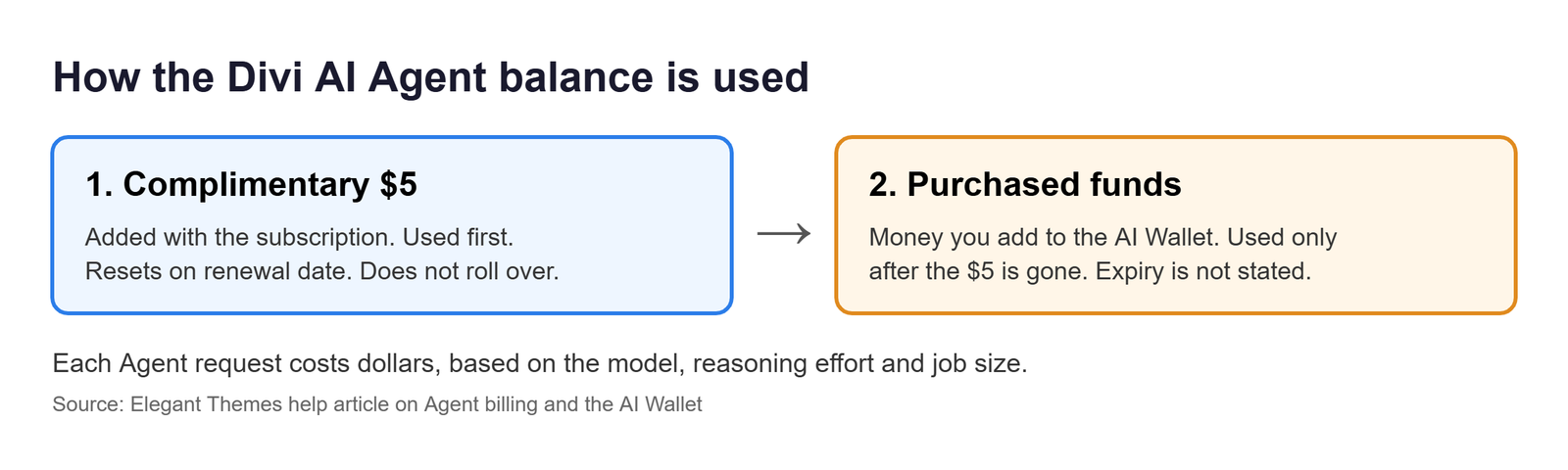
Every subscription includes a $5 Agent balance, which Divi Pro lists as $60 a year. Elegant Themes says plans “currently” include it, so it could change. Also, it is a dollar balance, not a number of requests. It appears in your AI Wallet the first time you sign in to the Agent in the Divi 5 builder. The balance belongs to your account and is shared across sites.
Reset and rollover
The balance resets to $5 on your subscription’s renewal date, not on the first of the month. Also, unused complimentary balance does not roll over. Elegant Themes’ pricing blog calls it a monthly balance, and Divi Pro lists $60 a year, which matches $5 a month. However, the help page does not explain how the reset works on yearly plans, so we cannot confirm it. Whether purchased funds expire is also not stated.
How a request is priced
Instead of a fixed price, cost depends on the model, the reasoning effort and the size of the job. Model providers set their prices, and Elegant Themes adds a small percentage it does not publish. Also, there is no published price per request.
Top-ups
Click the Wallet icon in the Agent, or use the AI Wallet page in your account. Then choose an amount and complete the payment. Purchased funds are used only after the monthly balance runs out. Also, the 30-day refund covers only unused purchased funds, not money already spent.
What Divi AI Actually Costs
These are Elegant Themes’ own examples, not our tests, and the company says results vary:
- One Professional Experience section cost $0.10 on Auto Value and $0.54 on Auto Premium.
- One recorded example rebuilt a screenshot into a nine-section page for about $0.10 on Auto Deep Value.
- A full custom layout costs less than five cents on average, “though individual builds vary”.
As a calculation, not a limit: if every request cost $0.10, $5 would cover about 50. At $0.54, it would cover about nine. In addition, follow-up corrections add cost.
Upgrading from Divi to Divi Pro
Divi Pro costs $188 more than Divi each year ($277 minus $89), about $15.67 a month. However, that is the price of the bundle, not of Divi AI alone ($193 a year on its page). It also pays for Cloud, VIP support and Teams.
Is Divi AI Worth the Price?
However, that depends on how you work. We have not tested it, so this is only a guide.
It may suit you if you build in Divi 5, want the other Pro extras anyway, and create similar pages often.
It is harder to justify if you stay on Divi 4 (no Agent), only need occasional copy, or would pay the extra $188 mainly for AI. At the listed discount, Divi ($89) plus the add-on ($193) is $282 a year, only $5 more than Divi Pro, which also adds Cloud, VIP and Teams. However, both prices may be promotional.
Divi AI vs Elementor AI
Instead, we compare how they charge, not which is better.
| Feature | Divi AI | Elementor AI |
|---|---|---|
| How you pay | Subscription or Divi Pro | Included in Elementor One. Its Angie assistant also has a free plan with daily credits |
| Allowance | Generation “unlimited” under fair use. Agent: $5 balance | 25,000 shared credits a month |
| Cost per action | Agent cost varies by model, in dollars | 1 to 40 credits per AI action |
| Rollover | Complimentary Agent balance does not roll over | Unused credits do not roll over |
Elementor’s pricing page lists Elementor One at $15 a month billed annually ($180 a year), renewing at $228 a year. When credits run out, you wait for next month or upgrade a tier. See our guide to AI web development tools.
How to Get Started with Divi AI
If you are new to Divi, buy a Divi membership first. For example, For example, Divi Pro includes Divi AI. Existing Divi users can add it on the Divi AI page.
For the Agent (Divi 5)
- First, open a page in the Divi 5 Visual Builder.
- Next, click the AI Agent icon in the builder toolbar.
- Sign in with your Elegant Themes account when asked. Elegant Themes says each site is connected separately. The first sign-in also adds your $5 balance.
- Then type your request and watch the Working notes.
- Finally, approve the save when it asks. To undo, click the Gear icon, then Undo.
For text, images and code
- First, open a module that accepts text, images or code.
- Then hover over the input box and click the Divi AI icon at the top right.
- For a background image, go to Content, Background, Background Image, and click that icon.
In Divi 4, a full site starts at WordPress Dashboard, Divi, Dashboard, then Generate A New Site.
Divi AI Limitations
- The Agent works only in Divi 5 and needs an active subscription.
- Also, it needs an internet connection, including on local and staging sites.
- Also, your page content goes to the chosen AI provider, such as Anthropic or OpenAI.
- It makes a similar design from a URL or screenshot, but but not an exact copy.
- You cannot connect your own API key yet. Elegant Themes lists MCP support as planned.
Who Should Use Divi AI
A good fit: Divi 5 users who want a builder assistant, and freelancers or teams who already want Divi Pro.
Probably not: people who are not on Divi, or who only need occasional text. If you are still choosing a platform, browse our AI tools directory.
Frequently Asked Questions
Is Divi AI free?
Only the trial, because it gives 100 uses per Elegant Themes username, with no Agent access.
Do I need a Divi membership to use Divi AI?
New users do, because Elegant Themes says to buy a Divi membership first and then add it. However, it does not say whether a lapsed licence counts.
How much is Divi AI by itself?
Existing Divi users pay $193 a year or $21.36 a month, a limited-time discount. See “Divi AI on its own” above.
Does the $5 roll over?
Unused complimentary balance does not. However, whether purchased funds expire is not stated.
Does the Agent work in Divi 4?
No, because the Agent needs Divi 5. However, the text, image and code tools work in Divi 4.22 and newer.
Final Verdict
It makes the most sense inside Divi Pro for people who already build in Divi 5. However, unknowns remain: how long the discount lasts, the $5 reset on yearly plans, and what happens if a yearly payment lapses. So check the live pricing page before you buy.
Sources
Elegant Themes and Elementor pricing pages were read in a browser on 5 November 2026. Other pages were checked on 4 and 5 November 2026.
- Elegant Themes pricing and Divi AI page
- Divi Lifetime and Pro page
- Are Divi Services available for Lifetime? (26 Nov 2024)
- Divi AI pricing overview
- Divi AI Agent billing and your AI wallet
- The Divi AI Agent in Divi 5
- How to use the Divi AI Agent in Divi 5
- What the Divi AI Agent can do in Divi 5
- How to use Divi AI in Divi 5
- How to use Divi AI in Divi 4
- How Divi AI Agents pricing works (21 Oct 2026)
- Exploring Divi 5’s AI Agents (17 Sep 2026)
- Introducing Divi AI Agents (3 Sep 2026)
- Elementor pricing and Elementor One
