
Introduction
Choosing between Cursor, Windsurf, and Copilot is harder in 2026, because two of the three products changed. Cursor is now sold through The X Subscription, which combines Cursor with Grok and X benefits. Windsurf now leads to Devin Desktop, a product from Cognition. GitHub Copilot is still a separate product, but it now uses a monthly AI credit system.
In this cursor vs windsurf vs copilot comparison, “Copilot” means GitHub Copilot. We compare these three AI coding assistants on what each tool is, what it costs, where it is limited, and who it fits best. All prices for this Cursor vs Windsurf vs GitHub Copilot 2026 guide were checked on official pages in October 2026. If you want a wider list, see our best AI coding tools for developers in 2026.
Cursor vs Windsurf vs Copilot: Quick Comparison
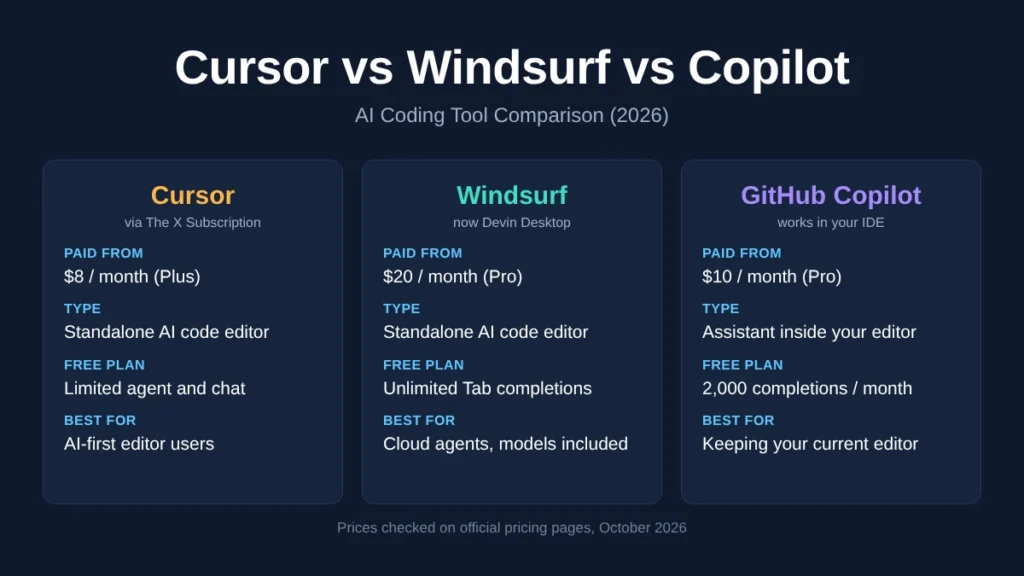
| Cursor | Windsurf (Devin Desktop) | GitHub Copilot | |
|---|---|---|---|
| Type | Standalone AI code editor | Standalone AI code editor | AI assistant inside your existing editor |
| Where it runs | Cursor app | Devin Desktop app | VS Code, Visual Studio, JetBrains, Xcode, Neovim, Eclipse, Zed, CLI, GitHub |
| Free plan | Limited agent and chat requests | Light agent quota, unlimited Tab completions | 2,000 completions per month, limited chat and agent use |
| Lowest paid plan | $8/month (Plus) | $20/month (Pro) | $10/month (Pro) |
| Third-party models | Premium and above, paid separately at API list price | Included in Pro quotas | Included, uses AI credits |
| Main strength | Deep AI editor with cloud agents and code review on Premium | Cloud agents, DeepWiki, generous free Tab | Works in the editor you already use |
| Main limitation | Usage pool shared with Grok; Plus has Grok models only | Highest entry price | Not a full AI-first editor |
The biggest difference is structure. Cursor and Devin Desktop ask you to switch editors. Copilot adds AI to the editor you already use.
Pricing Compared in 2026
Cursor: New Plans vs Legacy Plans
New Cursor plans are part of The X Subscription. The Cursor pricing page says these subscriptions are sold through X Subscription Corp, and that usage is pooled across Cursor and Grok and refreshes weekly.
| Plan | Price | Usage | Third-party models |
|---|---|---|---|
| Free | $0 | Limited | No |
| Plus | $8/month | Base pool | No (Grok models only) |
| Premium | $30/month | 4x Plus | Yes, paid separately |
| Super | $100/month | 15x Plus | Yes, paid separately |
| Ultra | $200/month | 50x Plus | Yes, paid separately |
| Teams | $30, $100, or $200 per seat/month | Matches seat tier | Yes, plus Token Rate |
How third-party model charges work: According to Cursor’s models and pricing docs, Claude, GPT, and Gemini models are not included in the weekly pool. On Premium and above, they are billed at the model’s API list price from prepaid credit. Teams and Enterprise requests to eligible models also carry a Cursor Token Rate of $0.25 per million tokens. Free and Plus do not include third-party models at all.
This matters for value. The $8 Plus plan is the cheapest paid option here, but it only gives you Grok models, and the same usage pool also covers Grok Chat, Voice, and Imagine. If you want Claude or GPT inside Cursor, your real cost is $30/month plus whatever you spend on model usage.
Legacy plans: Cursor’s docs say existing legacy plans (Pro, Pro+, Ultra, Start, and some Teams seats) keep their two monthly usage pools and on-demand usage. The official pages do not list current legacy prices, and they do not say new users can buy them.
Windsurf / Devin Desktop
| Plan | Price | Key features |
|---|---|---|
| Free | $0 | Light agent quota, limited models, unlimited inline edits and Tab |
| Pro | $20/month | More quota, frontier models (OpenAI, Claude, Gemini, SpaceXAI), free SWE-2, Devin Cloud |
| Max | $200/month | Significantly higher quotas |
| Teams | $80/month + $40/month per full seat | Up to 200 users, admin dashboard, priority support |
| Enterprise | Custom | SSO, VPC deployment option |
Source: Devin pricing. Usage refreshes daily and weekly. Extra usage is charged at API pricing.
GitHub Copilot
| Plan | Price | Monthly AI credits |
|---|---|---|
| Free | $0 | Limited chat and agent use |
| Pro | $10/month | $15 ($10 base + $5 flex) |
| Pro+ | $39/month | $70 ($39 base + $31 flex) |
| Max | $100/month | $200 ($100 base + $100 flex) |
Source: GitHub Copilot plans. One AI credit equals $0.01. Agent mode, code review, the cloud agent, and Copilot CLI use credits, and the cost depends on the model. GitHub notes that flex allotments may change over time.
Which is cheapest? Cursor Plus ($8) has the lowest price, but it is limited to Grok models and shares its pool with non-coding features. Copilot Pro ($10) is the lowest-cost plan built only for coding with access to models from several providers. Devin Desktop Pro ($20) costs the most at entry level. On Windsurf vs Copilot pricing, Copilot is cheaper at every matching individual tier: $10 vs $20 for the first paid plan, and $100 (Max) vs $200 (Max) at the top.
Cursor vs Windsurf
Both are standalone AI code editors, so this is the closest comparison.
Agents and context: Cursor Premium adds cloud agents, automations, code hosting, and AI code reviews. Devin Desktop Pro includes Devin Cloud agents, and Devin’s plan comparison also lists DeepWiki (a tool for understanding codebases) and Ask Devin.
Models: Devin Pro includes OpenAI, Claude, Gemini, and SpaceXAI models inside its quota. Cursor only gives third-party models on Premium and above, and charges for them separately. If you want Claude or GPT, Devin Pro at $20 can be simpler to budget than Cursor Premium at $30 plus usage.
Free plan: Devin’s free plan gives unlimited Tab completions and inline edits. Cursor’s free plan gives limited agent and chat requests.
Limitations: Cursor’s pool is shared with Grok and X features, so coding is not the only thing using your allowance. Devin Desktop has a higher starting price, and older tutorials still use the Windsurf name, which can be confusing when you search for help.
Cursor vs GitHub Copilot
Workflow: Cursor replaces your editor. Copilot works inside VS Code, Visual Studio, JetBrains IDEs, Xcode, Neovim, Eclipse, Zed, the terminal, and github.com. If your team uses different editors, Copilot avoids forcing one choice.
Completions: Copilot Free includes 2,000 completions per month. Every paid plan includes unlimited code completions and next edit suggestions.
Agents and GitHub integration: On Pro and above, you can assign work to Copilot and it creates a pull request. Pro and above also include pull request reviews on GitHub. Cursor Premium offers cloud agents and AI code reviews inside its own ecosystem.
Models: Copilot gives access to models from Anthropic, OpenAI, Google, xAI, Microsoft, and others, paid through AI credits. In Cursor, Plus is Grok-only, and other providers cost extra on Premium and above.
Best fit: Choose Cursor if you want one dedicated AI editor and are comfortable with The X Subscription. Choose Copilot if you want to keep your current editor or your work already runs through GitHub.
Windsurf vs GitHub Copilot
Environment: Devin Desktop is its own editor. Copilot works across many editors and GitHub itself.
Free plans: Devin Free offers unlimited Tab completions. Copilot Free caps completions at 2,000 per month but supports agent mode and the CLI with limited usage.
Agents: Devin Desktop is built around agent work, with Devin Cloud on Pro and DeepWiki listed in its plans. Copilot’s cloud agent fits into GitHub issues and pull requests, which suits teams already using GitHub for project tracking.
Price: See the pricing section above. For teams, Devin charges $80/month plus $40 per full seat; GitHub lists Copilot business pricing separately.
Best AI Coding Tool for Different Users
Beginners: GitHub Copilot Free inside VS Code is the easiest start, and 2,000 monthly completions are enough for learning. Devin’s free plan suits you if you want unlimited Tab completions.
Freelancers: Copilot Pro gives a simple $10 monthly base cost. Devin Pro at $20 suits freelancers who want frontier models and cloud agents included in one plan.
Professional developers and teams: Teams that use GitHub for issues and pull requests get the most from Copilot’s PR-based agent. Teams that want a dedicated AI editor can compare Cursor Teams and Devin Teams.
Large codebases: All three offer codebase-aware tools: Cursor’s cloud agents, Devin’s DeepWiki and Devin Cloud, and Copilot’s agent mode with MCP server support. Test each one on your own repository before paying for a higher plan.
Tight budgets: Copilot Pro is the lowest-cost coding plan with multi-provider models. Cursor Plus is cheaper, but only if Grok models meet your needs.
Pros and Cons
Cursor
- Pros: Dedicated AI editor, cloud agents and AI code review on Premium, low $8 entry price
- Cons: Plus is Grok-only, usage pool is shared with Grok and X, third-party models cost extra
Windsurf (Devin Desktop)
- Pros: Unlimited Tab on Free, frontier models included in Pro, Devin Cloud and DeepWiki
- Cons: Highest entry price at $20, name change can confuse search results and older guides
GitHub Copilot
- Pros: Works in many editors, broad model choice, PR-based agent on GitHub
- Cons: Not a full AI-first editor, credit costs vary by model and can be harder to predict
Frequently Asked Questions About Cursor vs Windsurf vs Copilot
Is Cursor AI better than GitHub Copilot?
Neither is better for everyone. Cursor is a dedicated AI editor, now sold with Grok and X benefits. Copilot works inside your current editor and supports more environments.
Is anyone still using GitHub Copilot?
Yes, Copilot is still actively offered and updated. In 2026, GitHub sells four individual plans with AI credits, adds new models from several providers, and supports VS Code, Visual Studio, JetBrains IDEs, Xcode, Neovim, Eclipse, Zed, and the terminal.
Is Windsurf part of Cursor?
No. They come from different companies. Windsurf.com now redirects to Devin Desktop from Cognition. Cursor is sold through The X Subscription.
Which is cheapest: Cursor, Windsurf, or Copilot?
Cursor Plus is $8/month, Copilot Pro is $10/month, and Devin Desktop Pro is $20/month. Cursor Plus only includes Grok models, so compare what each plan includes, not just the price.
Do all three have free plans?
Yes. Each free plan has limits: Cursor offers limited agent and chat requests, Devin Desktop offers a light agent quota with unlimited Tab, and Copilot offers 2,000 completions per month.
Can these tools edit multiple files?
Yes. All three have agent features that can make changes across files.
Which is better for coding: VS Code, Cursor, or Windsurf?
VS Code has no built-in AI by default, but you can add GitHub Copilot to it. Cursor and Devin Desktop have AI built in. Keep VS Code with Copilot if you like your current setup. Switch to Cursor or Devin Desktop if you want a fully AI-first editor.
Final Verdict
There is no single winner in the cursor vs windsurf vs copilot debate. The right choice depends on your workflow and budget.
- Choose GitHub Copilot if you want to keep your current editor, work heavily in GitHub, or want a predictable $10 coding plan.
- Choose Devin Desktop (Windsurf) if you want a dedicated AI editor with frontier models and cloud agents included in one $20 plan.
- Choose Cursor if you want a dedicated AI editor and you are comfortable with The X Subscription, or if Grok models on the $8 plan meet your needs.
Pricing and plan details for all three tools changed in 2026 and may change again. Check each official pricing page before you subscribe.
